
Push notifications look simple until you ship to production. Device tokens expire, permissions are denied, payloads fail silently, and users uninstall apps after being spammed. Here’s the architecture and workflow we use at Sybrix to build reliable push notification systems for both Android and iOS.
One of the biggest misconceptions in mobile development is that sending a push notification is just a call to Firebase Cloud Messaging (FCM).
It isn’t.
A production-ready notification system involves permission management, token lifecycle handling, backend infrastructure, user preferences, deep linking, monitoring, and platform-specific behavior.
At Sybrix, we try to keep the architecture simple while making it resilient enough for real-world products.
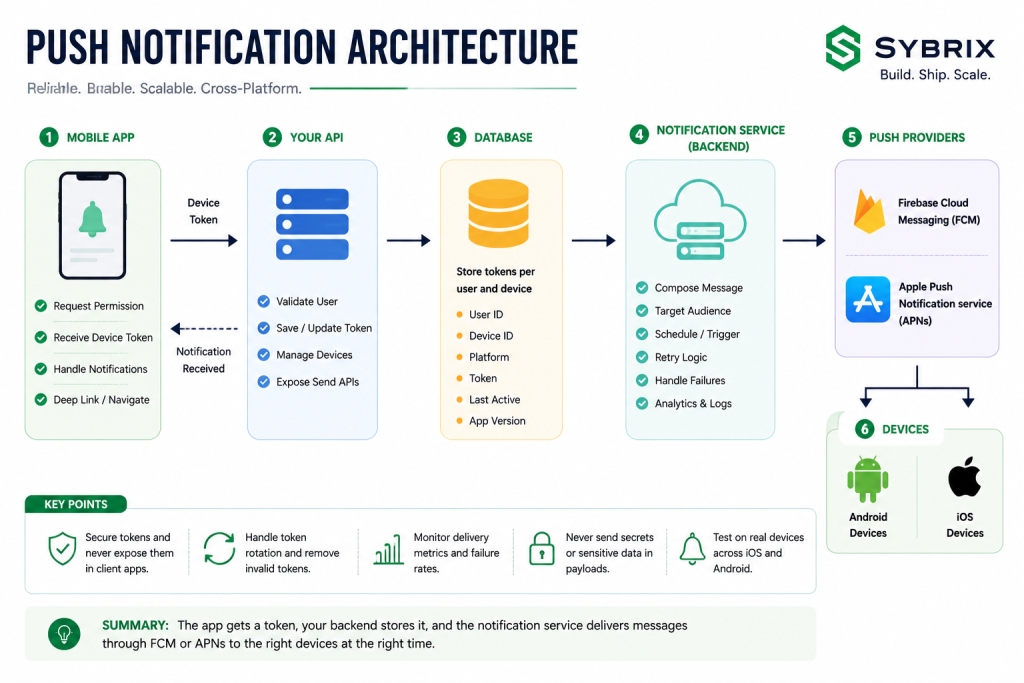
The Architecture We Use
Every push notification follows the same basic journey.
Mobile App
      │
      ▼
Request Notification Permission
      │
      ▼
Receive Device Token
      │
      ▼
Send Token to API
      │
      ▼
Store Token Per User & Device
      │
      ▼
Backend Notification Service
      │
      ▼
FCM / APNs
      │
      ▼
Android & iOS Devices
The important point is that the backend—not the mobile app—owns notification delivery.
This allows notifications to be sent from scheduled jobs, payment events, admin dashboards, webhooks, or background services without depending on a user’s current session.
Store Tokens Per Device
Never assume a user has one phone.
Many users have:
- Android phone
- iPhone
- Tablet
- Secondary device
Instead of storing one notification token per user, store one token per device.
A simple table usually contains:
- User ID
- Device ID
- Platform
- Notification token
- App version
- Last active date
This makes it much easier to manage multiple devices and remove inactive ones.
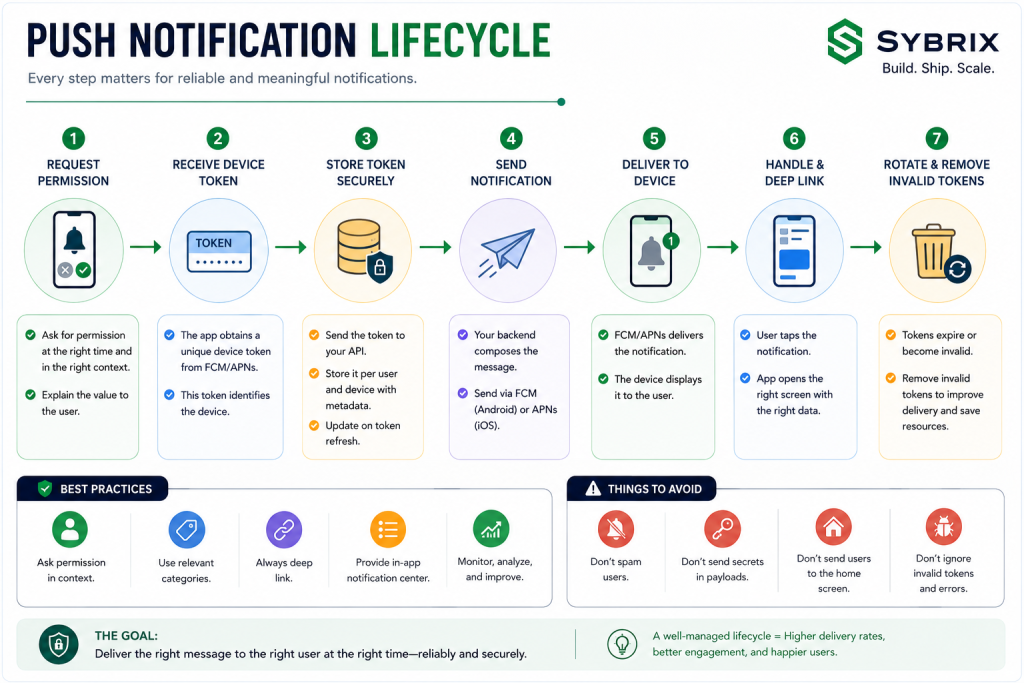
Handle Token Rotation Properly
Notification tokens change more often than many developers expect.
They may rotate because of:
- App reinstall
- Device restore
- Operating system updates
- Token refresh
- User logout
Whenever a new token is generated, immediately update it on your backend.
Never assume yesterday’s token still works today.
Ask for Permission at the Right Time
One of the biggest UX mistakes is requesting notification permission immediately after the app launches.
Users haven’t seen any value yet.
Instead, ask when notifications make sense.
Examples include:
- After placing an order
- Before tracking a delivery
- After enabling chat
- When following a topic
- Before booking an appointment
Context dramatically improves permission acceptance rates.
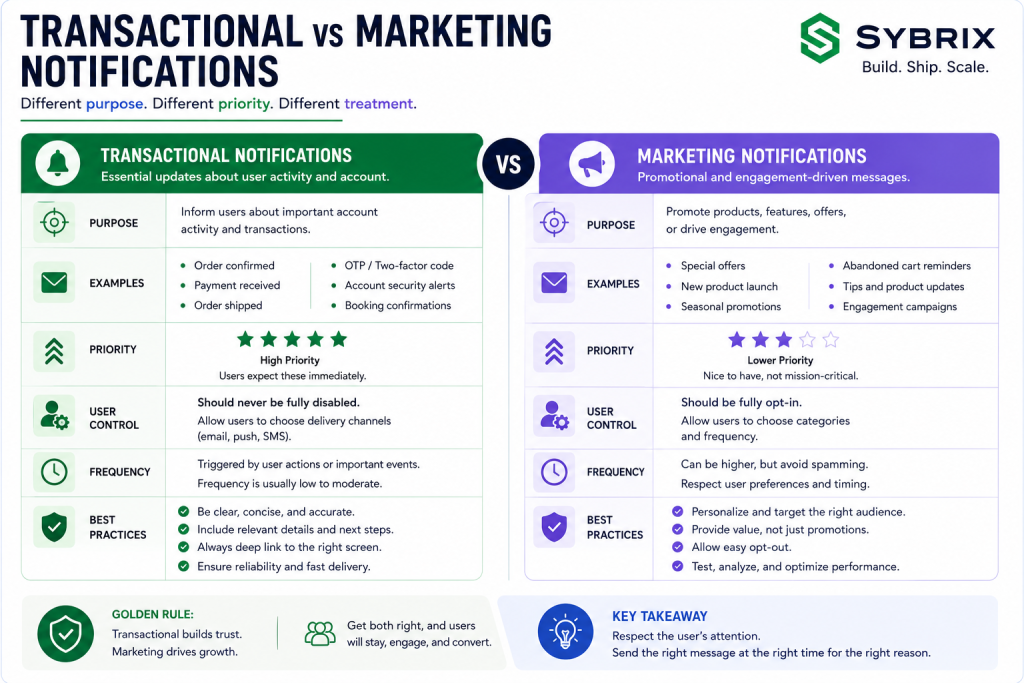
Separate Transactional and Marketing Notifications
Not every notification deserves the same priority.
We usually separate them into categories.
Transactional
- Payment received
- Order shipped
- OTP codes
- Account security
- Booking confirmation
These are essential.
Engagement
- Promotions
- New features
- Product recommendations
- Newsletters
Users should be able to disable marketing notifications without losing important account updates.
Always Deep Link
A notification should never open the home screen if a more relevant destination exists.
Instead:
- Order notification → Order details
- Chat message → Conversation
- Invoice → Invoice page
- Promotion → Campaign page
Every unnecessary tap increases the chance the user abandons the experience.
Build an In-App Notification Center
Push notifications aren’t guaranteed.
Users may:
- Disable notifications
- Dismiss them accidentally
- Change devices
- Miss them while offline
An in-app notification center ensures important updates remain available.
Think of push notifications as alerts—not permanent storage.
Operational Best Practices
Reliable notification systems require ongoing maintenance.
At Sybrix we regularly:
- Remove invalid tokens
- Monitor delivery failures
- Retry temporary failures
- Track open rates
- Measure notification latency
- Review platform error logs
Operational visibility matters just as much as implementation.
Security Considerations
Push payloads should never contain confidential information.
Avoid sending:
- Password reset tokens
- API keys
- Personal identification
- Authentication secrets
- Payment information
Instead, send only the information needed to identify the event, then retrieve sensitive data securely from your backend after the app opens.
Test on Real Devices
Emulators are useful during development, but they don’t always reflect production behavior.
Before every release, test on:
- Android device
- iPhone
- Different Android versions
- Different iOS versions
- Foreground notifications
- Background notifications
- Terminated app state
- Slow network conditions
Many notification issues only appear on physical devices.
Common Mistakes
The most common problems we encounter are:
- Sending notifications before requesting permission
- Storing only one device token per user
- Never deleting invalid tokens
- Sending users to the home screen
- Treating Android and iOS identically
- Putting sensitive information inside notification payloads
- Never measuring delivery success
Most production issues originate from one of these mistakes.
Final Thoughts
Push notifications should make your product feel responsive—not intrusive.
A reliable notification system isn’t built by simply connecting Firebase or APNs.
It’s built through thoughtful architecture, good user experience, secure payloads, and continuous monitoring.
If you get those fundamentals right, push notifications become one of the most valuable communication channels in your application instead of one of its biggest sources of bugs.
About the Author
Bashir Lucas Samson Lukman is a Full-Stack Cross-Platform Developer and the founder of Sybrix, where he builds scalable web and mobile applications while researching artificial intelligence, software architecture, cybersecurity, and emerging technologies. His writing focuses on AI, cloud infrastructure, mobile engineering, and building reliable production systems.