
A practical guide for businesses that hire developers to build websites, apps, and digital platforms.
A business owner recently told me something that I’ve heard in different forms many times:
“Our website was built by a developer, but we can’t access the hosting account. We’ve been trying to reach him.”
The website was theirs.
The business was theirs.
They had paid for the development.
But operationally, one person still held the keys.
This situation is surprisingly common.
A company hires a developer or agency to build a website or mobile application. Because the founders aren’t technical, they naturally allow the developer to handle everything.
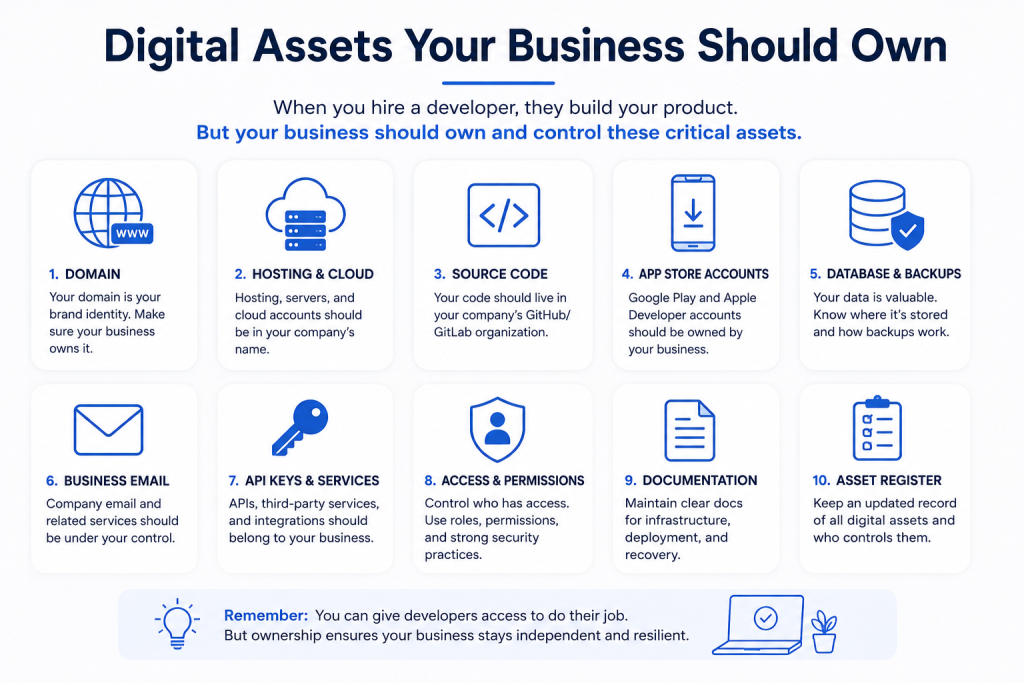
The developer registers the domain.
Creates the hosting account.
Sets up the server.
Creates the database.
Opens the Google Play or Apple developer account.
Configures email.
Creates API credentials.
Deploys the application.
Everything works, so nobody worries about who actually controls these accounts.
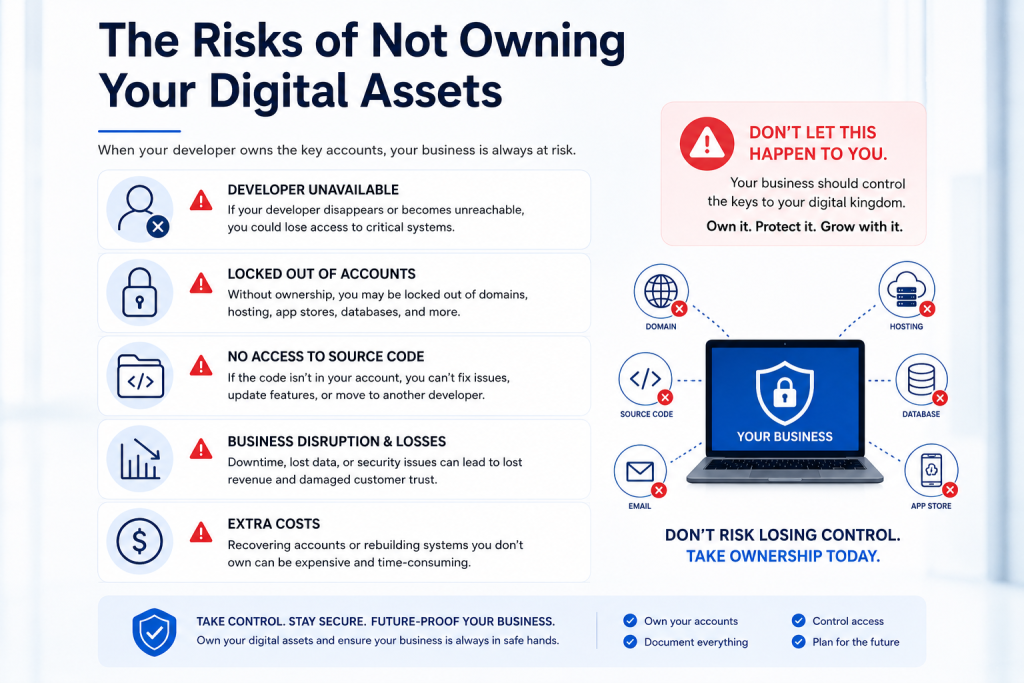
Until the developer isn’t available.
That’s when a software problem becomes a business problem.
The Developer Isn’t Necessarily the Problem
It’s important to make this distinction.
Giving developers access isn’t bad practice. They need access to do their jobs.
The problem is ownership.
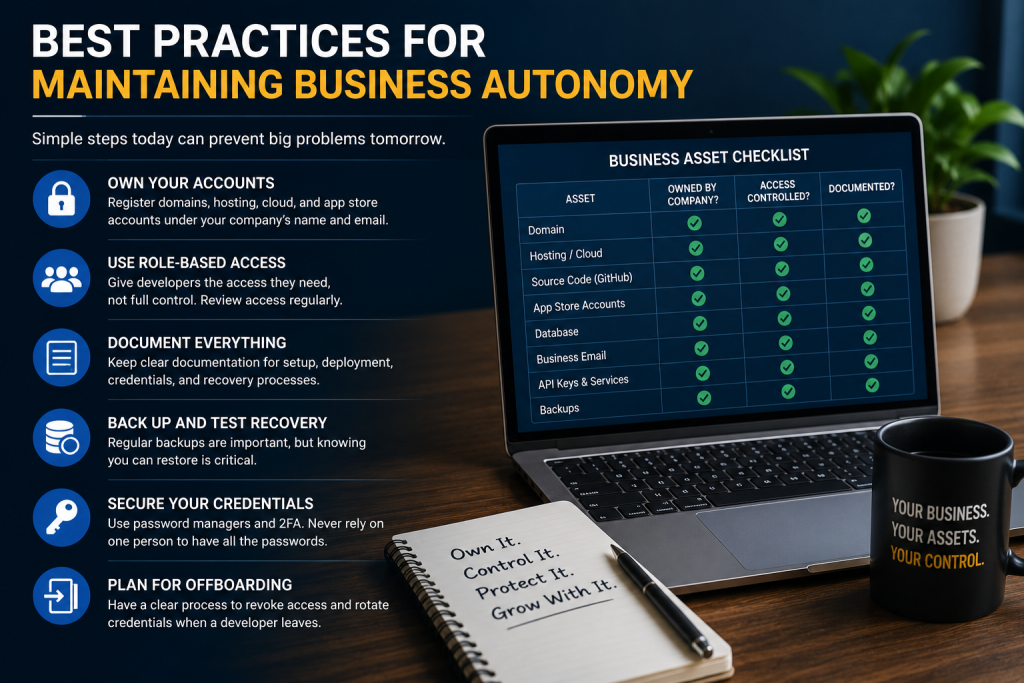
Your developer may administer your infrastructure, but the company should ultimately control the accounts and credentials on which the business depends.
Think about your company’s bank account.
Your accountant may manage financial records and transactions, but you wouldn’t normally expect the accountant to personally own the company’s bank account.
Technology should be treated similarly.
1. Your Business Should Own the Domain
Your domain might be one of your company’s most important digital assets.
If your business operates at yourcompany.com, the company should control the registrar account where that domain is registered.
Your developer can be given the permissions necessary to configure DNS.
But the business should control:
- The registrar account
- Recovery email
- Two-factor authentication
- Renewal information
- Billing
Losing control of your domain can affect your website, company email and other services simultaneously.
2. Own Your Hosting and Cloud Accounts
Whether your infrastructure runs on shared hosting, AWS, Azure, Google Cloud, DigitalOcean or another provider, the primary account should normally belong to the company.
Then give developers appropriate access.
This becomes particularly important as the company grows.
Your original developer might eventually be replaced by an internal engineering team or another agency.
That transition should involve changing permissions—not trying to recover infrastructure from someone else’s account.
3. Own Your Source Code
Your production application’s source code shouldn’t exist only on a developer’s laptop.
The company should have an organization or repository under a platform such as GitHub or GitLab, depending on the team’s workflow.
Developers receive access to repositories.
When someone leaves, their access can be removed.
The code remains with the organization.
There is another important issue here: your contract should clearly state who owns the resulting intellectual property and source code. Paying for development doesn’t automatically resolve every IP question in every jurisdiction or contract.
Make it explicit.
4. Own Your App Store Accounts
This becomes extremely important for mobile applications.
Your Google Play Console and Apple Developer accounts should normally belong to the organization publishing the application.
Don’t build a successful app entirely around an individual developer’s publishing account.
The developer can be invited with the permissions required to upload builds and manage releases.
If the relationship ends, you remove their access.
Your application stays where it is.
5. Control Your Database and Backups
Your database may contain some of the company’s most valuable operational information.
The business should know:
- Where the production database is hosted
- Who has access
- How backups work
- How frequently backups happen
- How restoration works
- Who can authorize access to production data
A backup that nobody knows how to restore isn’t much of a disaster-recovery strategy.
6. Don’t Let One Person Own Every Password
This is where password managers and role-based access become useful.
You don’t want important credentials scattered across:
- WhatsApp conversations
- Developer laptops
- Personal email accounts
- Random text files
Use organizational password management and proper user permissions wherever possible.
And don’t give everybody the master password either.
Good autonomy isn’t about everybody having access to everything.
It’s about the organization being able to grant, audit and revoke access.
7. Company Email Should Create Company Infrastructure
This is a simple habit that prevents many problems.
Instead of:
randomdeveloper@gmail.com
owning critical services, establish company-controlled addresses where appropriate, such as:
admin@company.com
or dedicated operational accounts.
Then configure recovery mechanisms that the organization controls.
That way, account recovery doesn’t depend on someone who left three years ago.
8. Ask for Documentation
Every serious software handover should include documentation.
It doesn’t have to be a 200-page technical manual.
At minimum, another competent developer should be able to determine:
- Where the code lives
- How the application is deployed
- Where production runs
- Which external services it depends on
- Where environment variables are configured
- How backups work
- How domains and DNS are configured
- How releases reach the app stores
- What monitoring exists
The test I like is simple:
If your current developer disappeared tomorrow, could another competent developer take over without rebuilding everything?
If the answer is no, your business has a continuity risk.
9. Keep an Asset Register
Businesses maintain records for physical assets.
Digital infrastructure deserves similar treatment.
Maintain a simple internal register containing things like:
| Asset | Company owns account? | Administrator | Recovery controlled by company? |
|---|---|---|---|
| Domain | Yes | IT/Admin | Yes |
| Hosting | Yes | Developer | Yes |
| Git repository | Yes | Engineering | Yes |
| Google Play | Yes | Product/Admin | Yes |
| Apple Developer | Yes | Product/Admin | Yes |
| Database | Yes | Engineering | Yes |
| Business email | Yes | Admin | Yes |
| Analytics | Yes | Marketing | Yes |
You don’t necessarily store passwords in this document.
You’re documenting what exists and who controls it.
10. Plan for Developer Offboarding Before You Need It
Companies think about onboarding developers.
They should think about offboarding too.
When a developer or agency stops working with you, there should be a process for reviewing and, where necessary, revoking or rotating:
- Repository access
- Server access
- SSH keys
- Cloud permissions
- Database credentials
- API keys
- App-store permissions
- CMS accounts
- Analytics access
- Deployment credentials
That’s normal security hygiene—not an accusation against the developer.
The Founder Doesn’t Need to Become Technical
This is perhaps the most important point.
Business autonomy doesn’t mean the CEO needs to learn AWS, Git or PostgreSQL.
You can—and should—delegate technical work to people who understand it.
But delegating administration is different from surrendering ownership.
Your lawyer understands law better than you do.
Your accountant understands accounting better than you do.
Your developer understands your infrastructure better than you do.
Professional expertise doesn’t require transferring ownership of critical company assets to the professional providing the service.
A Question Every Business Should Ask Today
If your company depends on a website, mobile application or software platform, ask:
If our developer became permanently unavailable today, what would we lose access to?
If the answer includes your domain, source code, hosting, database, business email or app-store account, don’t panic.
But start fixing the ownership structure.
Ask your developer to document the infrastructure and migrate company assets into company-controlled accounts where appropriate.
A professional developer should generally welcome that clarity.
Good engineering isn’t about making yourself impossible to replace.
It’s about building systems that continue working—even when the people working on them change.