
If I had to learn full-stack development from scratch today, I wouldn’t jump between dozens of random tutorials. I would build my foundation around CS50, then deliberately add the skills needed to ship real production applications.
There is a particular kind of frustration I see among people trying to become developers.
They have learned HTML.
They have watched a JavaScript course.
They have completed several FreeCodeCamp exercises.
They have followed YouTube tutorials.
Some have even worked through large parts of The Odin Project.
Yet when you ask them to build an application without following a tutorial, they freeze.
The problem is often not effort.
It is structure.
There are so many things you could learn that it becomes difficult to know what you should learn, in what order, and when you know enough to move forward.
If someone asked me for a structured path from beginner to full-stack developer, one of the foundations I would recommend is Harvard’s CS50 ecosystem.
But CS50 alone isn’t the entire roadmap.
The goal is to use it as the backbone, then add the practical engineering skills required to go from:
“I know how to program.”
to:
“I can build, deploy, debug and maintain a real application.”
Here is the roadmap.
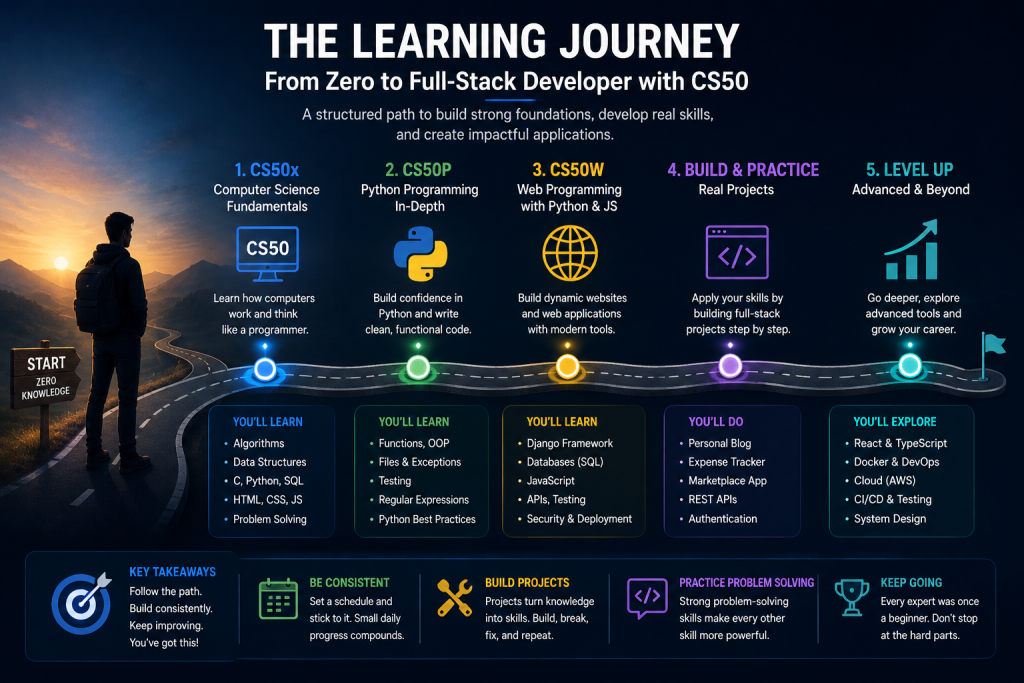
Stage 1: CS50x — Build the Computer Science Foundation
Start with CS50x: Introduction to Computer Science.
This is where I would begin even if the ultimate goal is web development.
That may seem unnecessary.
Why learn about algorithms, memory and C when you just want to build websites?
Because your goal shouldn’t be to become someone who knows React.
Your goal should be to become someone who understands programming well enough to learn React—or whatever replaces it.
CS50x introduces you to concepts such as:
- Computational thinking
- Algorithms
- Data structures
- Memory
- C
- Python
- SQL
- HTML
- CSS
- JavaScript
- Problem solving
C is particularly valuable here.
Modern languages hide an enormous amount of complexity from developers. C exposes some of it.
You begin to understand memory, pointers, data representation and what your program is actually asking a computer to do.
You don’t need to become a C developer.
You need the mental model.
Your goal at this stage
Don’t race through the lectures.
Do the problem sets.
Struggle with them.
Debug your own mistakes.
The struggle is part of the course.
When you finish CS50x, you shouldn’t merely know several programming languages.
You should be significantly better at breaking problems into smaller computational steps.
That ability follows you into every technology that comes later.
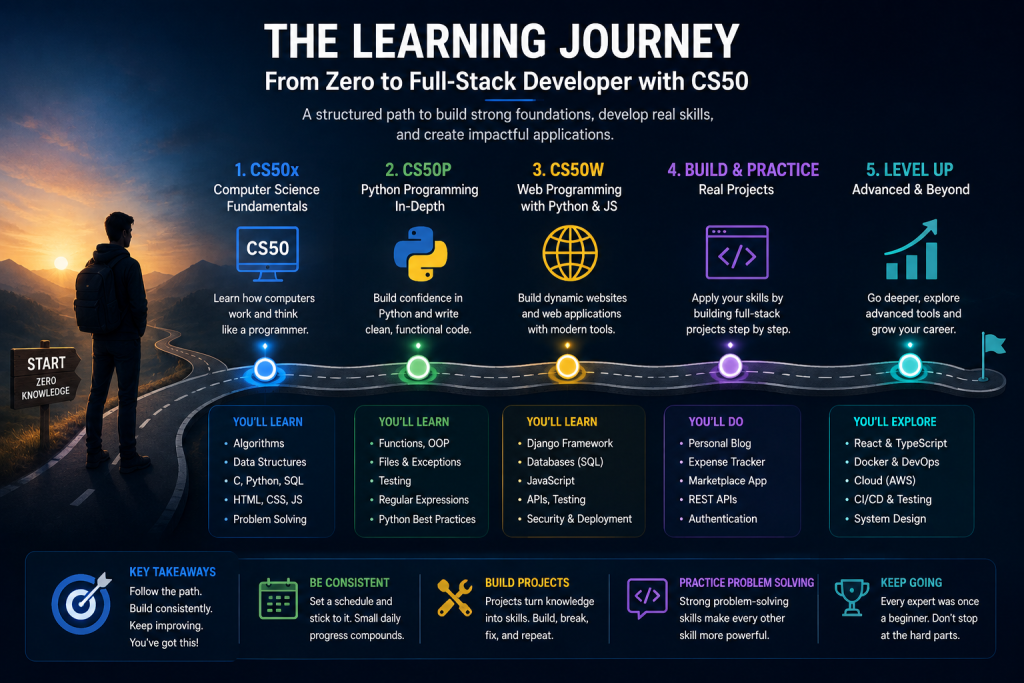
Stage 2: CS50P — Get Really Comfortable With Python
After CS50x, I would move to CS50’s Introduction to Programming with Python (CS50P).
CS50x introduces Python.
CS50P gives you the opportunity to become comfortable with it.
You’ll encounter concepts such as:
- Variables
- Functions
- Conditionals
- Loops
- Exceptions
- Libraries
- Unit testing
- File I/O
- Regular expressions
- Object-oriented programming
This is where programming should begin feeling less mysterious.
You should reach the point where you can look at a problem and think:
“I can probably write a program for that.”
Instead of:
“Which tutorial teaches me how to do this?”
That distinction matters.
Stage 3: Learn Git and GitHub Properly
Now introduce professional version control into everything you build.
Don’t treat Git as something you will learn when you get a job.
Start now.
Learn:
git initgit clonegit addgit commitgit pushgit pull- Branches
- Merging
- Merge conflicts
.gitignore- Pull requests
Then create a GitHub account and start keeping your projects there.
You are developing an important habit:
Your source code should have history.
As your projects become larger, you’ll understand why.
Stage 4: CS50W — Enter Full-Stack Web Development
Now we get serious about the web.
Take CS50’s Web Programming with Python and JavaScript (CS50W).
This is where the earlier foundation starts coming together.
You’ll work with technologies and concepts around:
- HTML
- CSS
- Git
- Python
- Django
- SQL
- JavaScript
- User interfaces
- Testing
- CI/CD
- Scalability
- Security
More importantly, you start thinking about applications as systems.
A web application isn’t simply HTML with a database attached.
You have a browser communicating with a server.
The server processes requests.
Business logic executes.
The database stores state.
Authentication determines identity.
Authorization determines what that identity can do.
JavaScript manages interactions in the browser.
APIs move structured data between systems.
Once you understand those relationships, full-stack development becomes much easier to reason about.
Stage 5: Go Deeper Into HTML and CSS
CS50W introduces web technologies, but don’t stop there.
Spend additional time becoming genuinely comfortable with HTML and CSS.
Learn:
- Semantic HTML
- Forms
- Accessibility basics
- CSS selectors
- Box model
- Flexbox
- CSS Grid
- Responsive design
- Media queries
- CSS variables
- Browser developer tools
Then recreate interfaces without tutorials.
Pick a website you like and reproduce its layout.
Not its backend.
Just the interface.
You’ll learn more from trying to reproduce a difficult responsive layout than from watching another four-hour CSS tutorial.
Stage 6: Learn JavaScript Beyond the Basics
Now deepen your JavaScript knowledge.
You should understand:
- Variables and scope
- Functions
- Arrays and objects
- Array methods
- DOM manipulation
- Events
- Modules
- Promises
async/await- Fetch API
- Error handling
- JSON
- Closures
- Modern ES syntax
Most importantly, understand asynchronous programming.
Modern web applications constantly communicate with APIs, databases and remote services.
If asynchronous programming remains mysterious, frontend development becomes unnecessarily painful.
Stage 7: Build Full-Stack Applications Without React
This step is important.
Before jumping into React, prove that you understand the web itself.
Build several applications with something like:
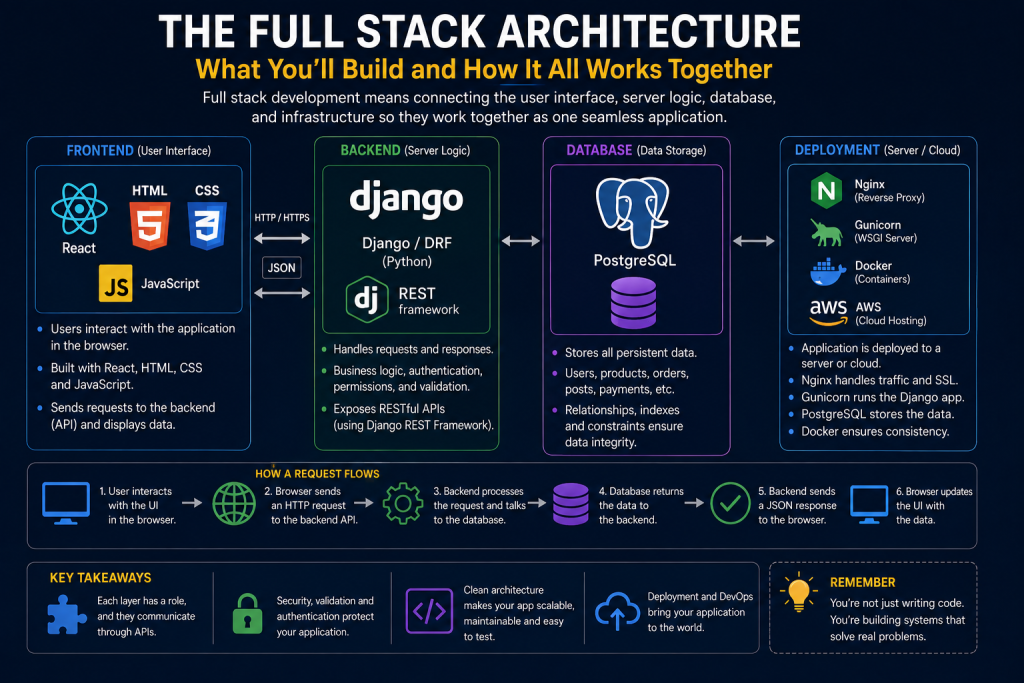
Django + PostgreSQL + HTML/CSS + JavaScript
Build projects such as:
Project 1 — Personal Blog
Include:
- Authentication
- Posts
- Categories
- Comments
- Admin
- Search
Project 2 — Expense Tracker
Include:
- User accounts
- Transactions
- Categories
- Monthly reports
- Charts
- CSV export
Project 3 — Small Marketplace
Include:
- Sellers
- Products
- Images
- Search
- Cart
- Orders
- Basic payment integration
At this point, you’ll discover something important:
Projects expose what tutorials hide.
Suddenly you have questions about validation.
Permissions.
Database relationships.
File uploads.
Authentication.
Error handling.
Deployment.
These are the problems that turn programming knowledge into engineering experience.
Stage 8: Learn Databases Properly
Don’t allow Django’s ORM to become magic.
Learn SQL.
Understand:
- Tables
- Primary keys
- Foreign keys
- Relationships
SELECTINSERTUPDATEDELETEJOIN- Indexes
- Constraints
- Transactions
- Normalization
- Query performance
Use PostgreSQL for your serious projects.
An ORM is incredibly useful, but a full-stack developer should understand what the ORM is doing on their behalf.
When production becomes slow, "Model.objects.all()" worked in development isn’t much of a diagnosis.
Stage 9: Learn APIs and Django REST Framework
Now separate your frontend from your backend.
Learn REST API development using Django REST Framework.
Understand:
- HTTP methods
- HTTP status codes
- JSON
- Serialization
- Authentication
- Authorization
- Pagination
- Filtering
- Validation
- CORS
- Rate limiting
- API versioning
Build an API for one of your previous projects.
Instead of Django returning HTML, let it return JSON.
For example:
GET /api/products/
might return product data.
POST /api/orders/
might create an order.
This is an important transition because the same backend can eventually serve:
- A website
- A mobile application
- An admin dashboard
- Another service
Now you’re thinking beyond pages.
You’re designing systems.
Stage 10: Learn React
Now React makes much more sense.
You already understand JavaScript.
You understand APIs.
You understand HTTP.
You understand backend development.
You understand databases.
React is simply another tool in your system.
Learn:
- Components
- Props
- State
- Hooks
- Forms
- Routing
- API calls
- Loading states
- Error states
- Context
- State management when necessary
Then rebuild the frontend of one of your Django applications using React.
Your architecture might now look like:
React → Django REST API → PostgreSQL
That is a legitimate modern full-stack architecture.
Stage 11: Learn TypeScript
Once you’re comfortable with JavaScript and React, add TypeScript.
Don’t learn TypeScript because everyone says modern developers should use it.
Learn it because you’ll now understand the problems it solves.
You’ll appreciate:
- Static typing
- Interfaces
- Type aliases
- Generics
- Better editor tooling
- Compile-time error detection
On larger frontend projects, these benefits become increasingly obvious.
Stage 12: Learn Linux
Eventually, your application has to live somewhere.
That means you should become comfortable with Linux.
You don’t need to become a Linux systems administrator.
But learn:
- Navigating the terminal
- Files and directories
- Permissions
- Processes
- Environment variables
- SSH
- Package management
- Logs
- Basic networking
- Services
Being unable to operate outside your IDE severely limits you as a full-stack developer.
Stage 13: Learn Deployment
Take one of your applications and put it on the internet.
Not through a magic “Deploy” button initially.
Understand what’s happening.
Learn about:
- Domains
- DNS
- Servers
- HTTPS
- SSL certificates
- Environment variables
- Reverse proxies
- Application servers
- Static files
- Media files
- PostgreSQL
- Backups
For a Django application, you might eventually encounter an architecture resembling:
Internet → Nginx → Gunicorn/Uvicorn → Django → PostgreSQL
You don’t need to memorize the stack.
Understand why each piece exists.
Stage 14: Learn Docker
Once you’ve experienced the pain of configuring environments manually, Docker becomes much easier to appreciate.
Learn:
- Images
- Containers
- Dockerfiles
- Volumes
- Networks
- Docker Compose
- Environment variables
Containerize one of your existing projects.
For example:
Django + PostgreSQL + Redis
Don’t begin your programming journey with Kubernetes.
You don’t need seventeen containers to build a todo application.
Add infrastructure knowledge when you understand the problem it solves.
Stage 15: Learn Testing
Tutorials tend to celebrate when the application works.
Production engineering asks:
What happens when it doesn’t?
Learn:
- Unit testing
- Integration testing
- API testing
- Frontend testing
- Mocking
- Test databases
Test important flows such as:
- Registration
- Login
- Permissions
- Checkout
- Payments
- Password reset
A full-stack developer shouldn’t rely entirely on clicking around the application and hoping everything still works.
Stage 16: Learn CI/CD
Now automate parts of your engineering workflow.
Learn how tools such as GitHub Actions can automatically:
- Run tests
- Check formatting
- Build applications
- Perform security checks
- Deploy code
You are moving from:
“I can build software.”
toward:
“I can operate software.”
That’s a major distinction.
Stage 17: Learn Security as Part of Development
Security shouldn’t be a separate chapter you read after finishing your application.
Understand common issues around:
- SQL injection
- Cross-site scripting
- CSRF
- Authentication
- Authorization
- Password hashing
- Secure cookies
- HTTPS
- Secrets management
- File uploads
- API permissions
- Dependency vulnerabilities
And develop one habit early:
Never trust input simply because it came from your own frontend.
The server must enforce the rules.
Stage 18: Learn Cloud Fundamentals
Now explore a cloud platform.
AWS is a reasonable choice, but Azure, Google Cloud and others can teach similar concepts.
Don’t attempt to learn every cloud service.
Understand the fundamentals:
- Compute
- Object storage
- Managed databases
- Networking
- DNS
- Load balancing
- Monitoring
- Identity and permissions
- Backups
Deploy something.
Break it.
Fix it.
You’ll learn more that way than memorizing hundreds of cloud service names.
Stage 19: Build One Serious Capstone
Now stop building todo applications.
Build something that takes weeks or months.
For example:
- E-commerce platform
- Learning management system
- Social network
- Job marketplace
- SaaS application
- Booking platform
- Inventory management system
Include real engineering concerns:
- Authentication
- Roles and permissions
- Payments
- File uploads
- Search
- Background jobs
- Notifications
- Logging
- Error handling
- Tests
- Backups
- Deployment
Put it online.
Let real people use it.
Their behaviour will expose assumptions you didn’t know you had.
The Complete CS50 Full-Stack Roadmap
The path now looks roughly like this:
CS50x
↓
CS50P
↓
Git + GitHub
↓
CS50W
↓
HTML + CSS deeper dive
↓
JavaScript
↓
Django projects
↓
SQL + PostgreSQL
↓
Django REST Framework + APIs
↓
React
↓
TypeScript
↓
Linux
↓
Deployment
↓
Docker
↓
Testing
↓
CI/CD
↓
Security
↓
Cloud fundamentals
↓
Serious production project
That’s a lot.
And that’s okay.
You are learning a profession, not completing a weekend challenge.
What About FreeCodeCamp and The Odin Project?
Use them.
They’re excellent resources.
But don’t turn learning into a competition to collect completed curricula.
If FreeCodeCamp has a great section that helps you understand CSS Grid, use it.
If The Odin Project has a project that forces you to practise JavaScript, build it.
If a YouTube instructor explains something better than your primary course, watch them.
The difference is that you now have a roadmap.
Those resources become supplements instead of competing directions.
What About AI?
Use it.
But don’t let AI rob you of the difficult part of learning.
If you’re stuck on a CS50 problem, asking an AI to produce the complete solution may get you through the exercise while leaving the actual skill behind.
A better use is asking:
“Explain why my approach isn’t working without giving me the complete solution.”
Or:
“Explain this error message.”
Or:
“Give me a smaller example that demonstrates this concept.”
AI can dramatically accelerate learning.
It can also dramatically accelerate pretending to learn.
The difference is how you use it.
You Don’t Need to Know Everything Before Applying for Jobs
This roadmap is not a checklist that must reach 100% before you’re allowed to call yourself a developer.
You can begin applying for internships, junior positions and freelance opportunities much earlier.
Once you can independently build and deploy a useful full-stack application, start looking for opportunities.
Continue learning while working.
That’s what professional developers do anyway.
Stop Measuring Progress by Hours of Video Watched
This may be the most important advice in the entire roadmap.
Don’t say:
“I completed 60 hours of Python tutorials.”
Ask:
“What can I build with Python without following one?”
Don’t say:
“I’ve finished three React courses.”
Ask:
“Can I build an interface, connect it to an API, handle loading and errors, and debug it when something goes wrong?”
Courses provide knowledge.
Projects reveal whether that knowledge became skill.
Final Thoughts
If I were starting full-stack development again, I wouldn’t try to learn everything at once.
I would build layers.
CS50x would teach me how computers and programs work.
CS50P would make me comfortable programming.
CS50W would connect those skills to the web.
Then I would deliberately expand into databases, APIs, frontend frameworks, Linux, deployment, Docker, testing, security and cloud infrastructure.
And throughout the entire journey, I would build.
Because ultimately, becoming a full-stack developer isn’t about knowing the largest number of technologies.
It’s about being able to take an idea and understand enough of the stack to turn it into a working, secure and maintainable product.
Don’t collect tutorials.
Build the foundation. Build projects. Then build systems.
About the Author
Bashir Lucas Samson Lukman is a Full-Stack Cross-Platform Developer and the founder of Sybrix, where he builds scalable web and mobile applications while researching artificial intelligence, software architecture, cybersecurity, and emerging technologies. His writing focuses on practical software engineering, AI, developer education, and building reliable digital products.