
Authentication is one of the easiest parts of a mobile backend to get wrong. Many teams simply expose Django REST Framework endpoints, add JWT support, and assume everything will work. Then come mysterious 401 responses, expired tokens, broken refresh logic, and frustrated users. Here’s the authentication pattern we recommend at Sybrix when building Flutter and React Native applications with Django.
By Bashir Lucas Samson Lukman
A browser and a mobile app don’t authenticate the same way.
Browsers naturally work well with server-side sessions and cookies.
Mobile applications don’t.
Trying to force browser authentication patterns into mobile clients usually creates unnecessary complexity and subtle bugs.
The solution isn’t choosing one authentication method for everything—it’s choosing the right one for each client.
Understand the Difference
A typical Django admin panel benefits from:
- Session authentication
- Secure HTTP-only cookies
- CSRF protection
- Traditional login/logout
A mobile application benefits from:
- JWT access tokens
- Refresh tokens
- Secure token storage
- Explicit authentication headers
Keeping these concerns separate makes both systems easier to maintain.
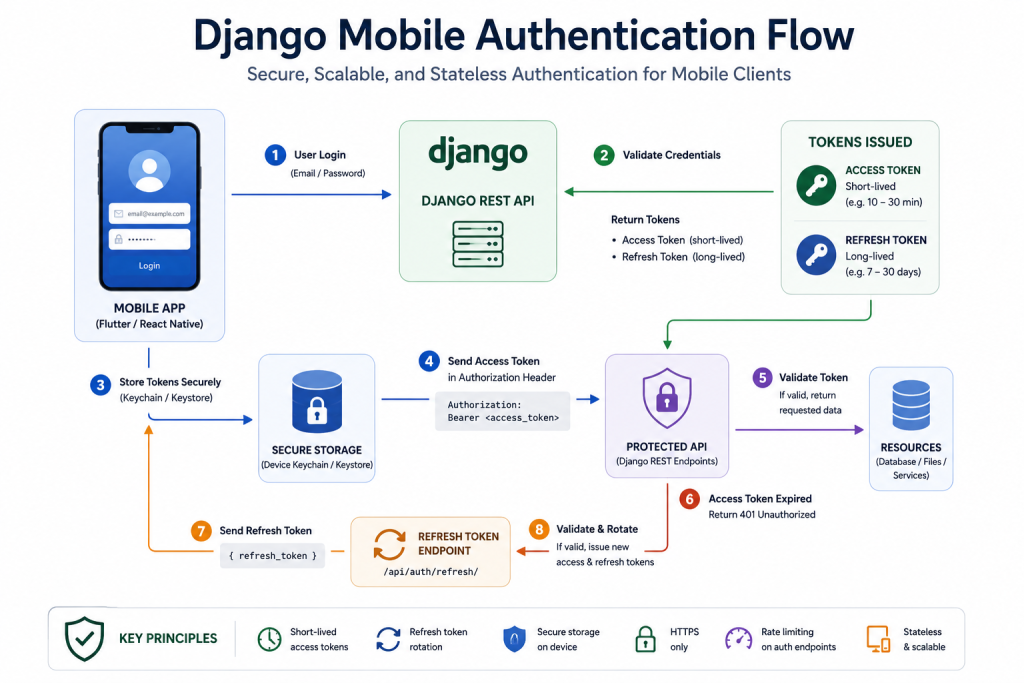
The Architecture We Use
A typical authentication flow looks like this:
User Login
      │
      ▼
Django API
      │
      ▼
Access Token (Short-lived)
Refresh Token (Long-lived)
      │
      ▼
Flutter / React Native
      │
      ▼
Authorization: Bearer <token>
      │
      ▼
Protected API
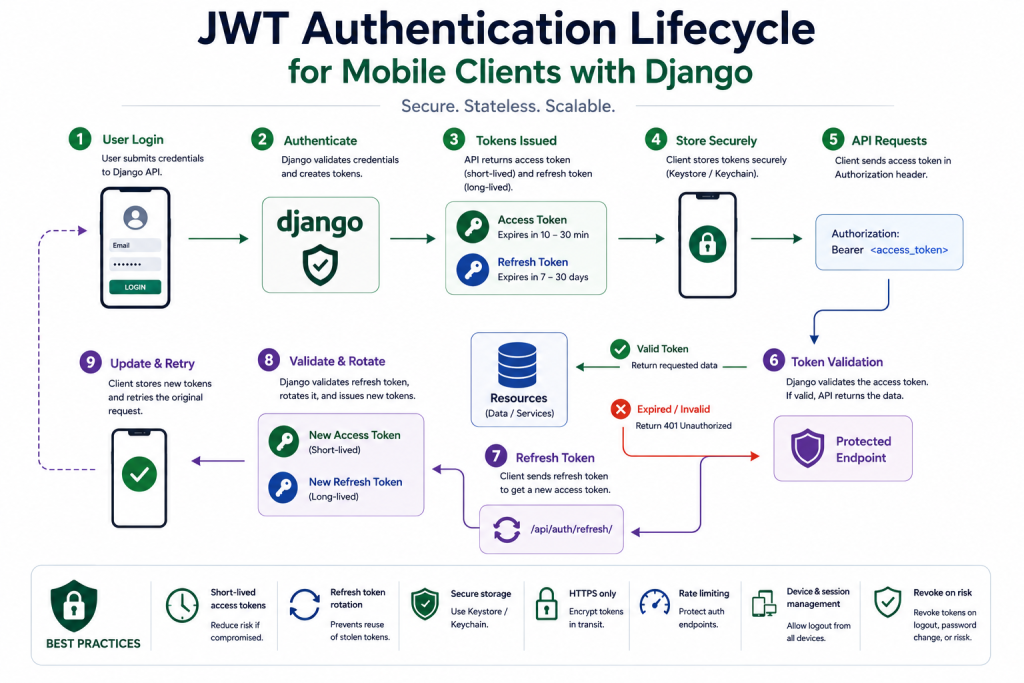
When the access token expires, the refresh token requests a new one without forcing the user to log in again.
Keep Access Tokens Short-Lived
Access tokens should expire quickly.
Typical lifetimes range from:
- 10 minutes
- 15 minutes
- 30 minutes
If an access token is compromised, limiting its lifetime reduces the damage.
The refresh token exists specifically to improve user experience without sacrificing security.
Rotate Refresh Tokens
Refreshing should generate a new refresh token whenever possible.
This helps detect stolen tokens and reduces the lifetime of leaked credentials.
Token rotation is one of the simplest improvements that significantly strengthens mobile authentication.
Revoke Sessions Properly
Logging out shouldn’t simply delete local storage.
Your backend should invalidate refresh tokens when users:
- Log out
- Change passwords
- Reset passwords
- Report compromised accounts
Otherwise, stolen refresh tokens may remain valid long after the user believes they’re signed out.
Store Tokens Securely
Never store authentication tokens in plain application storage.
Instead, use secure platform storage.
Examples include:
- Android Keystore
- iOS Keychain
These mechanisms provide significantly better protection against credential theft.
Always Use HTTPS
Authentication tokens should never travel over unsecured connections.
HTTPS should be mandatory for:
- Login
- Registration
- Token refresh
- Password reset
- Authenticated API requests
Transport security is just as important as token security.
Rate Limit Authentication Endpoints
Login and refresh endpoints receive constant attention from attackers.
Rate limiting helps reduce:
- Brute-force attacks
- Credential stuffing
- Automated abuse
Authentication endpoints deserve stricter limits than most API routes.
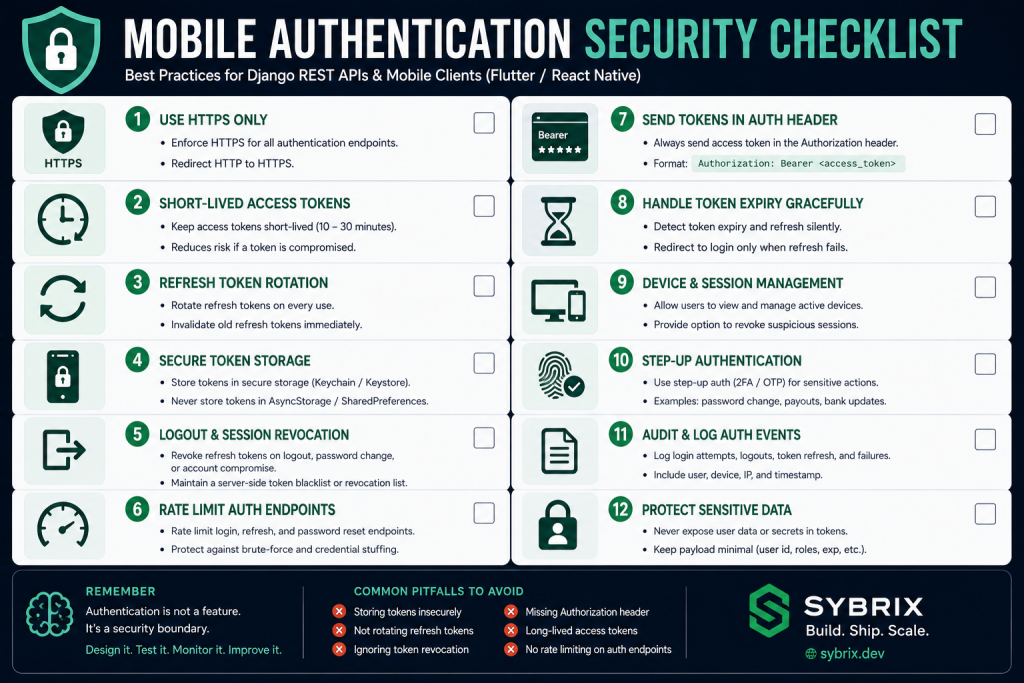
Common Mistakes
Some of the most common authentication issues include:
- Forgetting to refresh expired tokens.
- Storing refresh tokens insecurely.
- Missing the
Authorizationheader on file downloads. - Ignoring device logout.
- Trusting client-side expiration checks.
- Using excessively long-lived access tokens.
These problems often appear only after an application reaches real users.
Additional Features for High-Trust Products
Applications involving payments or sensitive data often benefit from additional controls such as:
- Device management
- Active session lists
- Login history
- Step-up authentication
- Two-factor authentication
- Email alerts for new devices
These features increase transparency and help users detect unauthorized access.
Final Thoughts
Authentication isn’t a package you install.
It’s a security system you operate.
The goal isn’t simply allowing users to sign in.
The goal is ensuring they can sign in safely, stay signed in reliably, and recover quickly if something goes wrong.
A clean authentication architecture today prevents many of tomorrow’s support tickets and security incidents.
About the Author
Bashir Lucas Samson Lukman is a Full-Stack Cross-Platform Developer and the founder of Sybrix, where he builds scalable web and mobile applications while researching artificial intelligence, software architecture, cybersecurity, and emerging technologies. His writing focuses on software engineering, cloud infrastructure, AI, and building reliable digital products.