
Most Flutter tutorials place nearly everything inside lib/main.dart. That approach is fine for learning, but production applications require a structure that scales as features, developers, and business requirements grow. Here’s the architecture we use at Sybrix when building Flutter applications for real-world products.
The first version of almost every Flutter application feels simple.
A few screens.
A few API calls.
A handful of widgets.
Then new features arrive.
Authentication becomes more complex.
Push notifications appear.
Offline support is requested.
Before long, a once-simple project becomes difficult to navigate.
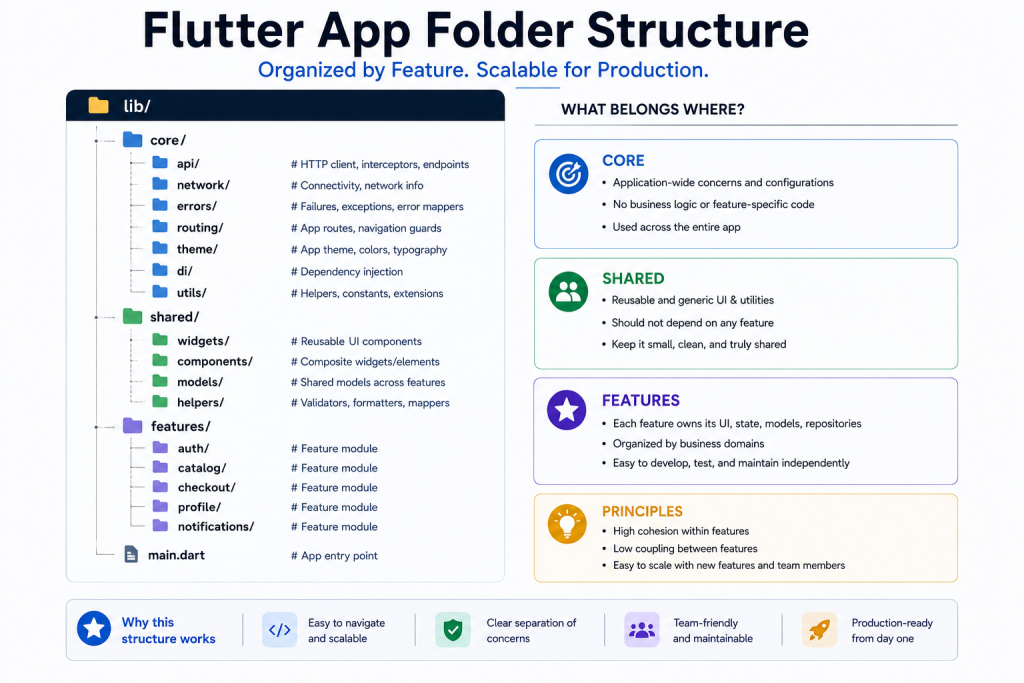
That’s why we organize Flutter applications around features rather than individual file types.
Organize by Feature, Not Widget Type
Instead of placing every screen in one folder and every provider in another, we group everything required for a feature together.
A typical project looks like this:
lib/
│
├── core/
│   ├── api/
│   ├── routing/
│   ├── theme/
│   ├── network/
│   ├── errors/
│   └── utils/
│
├── shared/
│   ├── widgets/
│   ├── components/
│   └── models/
│
├── features/
│   ├── auth/
│   ├── profile/
│   ├── catalog/
│   ├── checkout/
│   └── notifications/
│
└── main.dart
Each feature owns everything related to that business domain.
Keep Core Truly Shared
The core directory should contain code used throughout the application.
Examples include:
- HTTP client
- Authentication interceptors
- Routing
- Theme configuration
- Dependency injection
- Error handling
- Network utilities
Business logic should never live here.
Shared Widgets Stay Generic
Reusable components belong inside shared/.
Typical examples include:
- Buttons
- Loading indicators
- Dialogs
- Empty states
- Form fields
- Cards
If a widget only belongs to one feature, keep it inside that feature instead.
Be Consistent with State Management
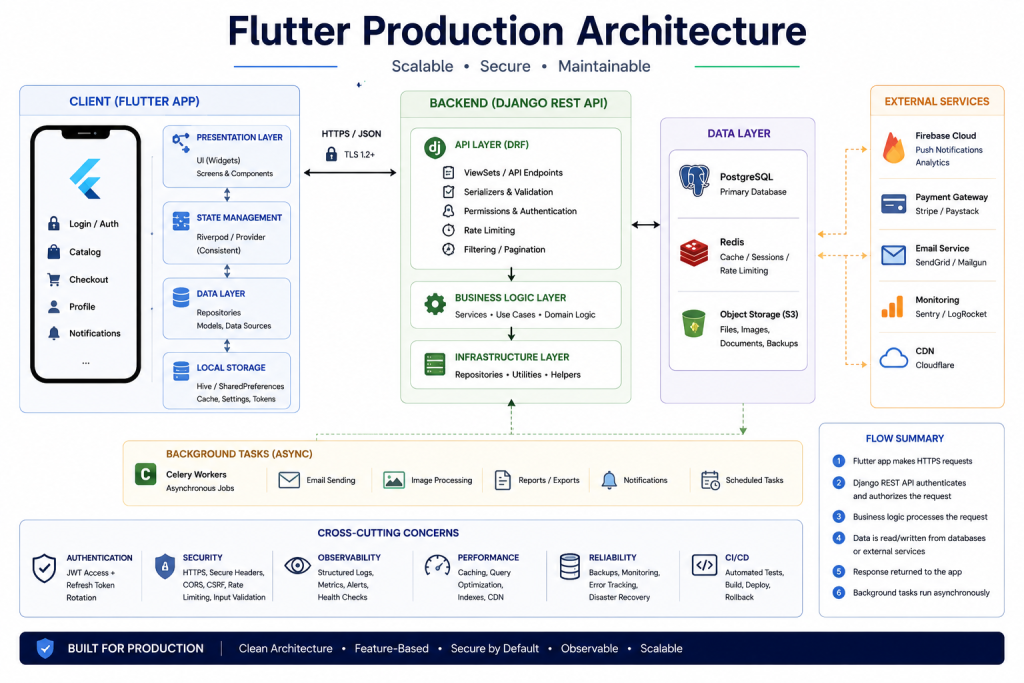
Every state management solution can build production applications.
The important part is consistency.
Whether your team chooses:
- Riverpod
- Bloc
- Provider
- Cubit
stick with it.
Mixing multiple approaches usually creates unnecessary complexity.
Treat API Errors as User Experience
Never expose raw exceptions to users.
Instead, convert network failures into typed application errors.
Examples include:
- No Internet
- Authentication Expired
- Server Error
- Validation Error
- Unknown Error
The UI should know how to display each one appropriately.
Separate Environments
Production applications should never depend on manually changing URLs before release.
Instead, configure separate environments such as:
- Development
- Staging
- Production
Each environment should provide its own:
- Base API URL
- Firebase project
- Analytics configuration
- Crash reporting
- API keys
Automation reduces deployment mistakes.
Test What Matters
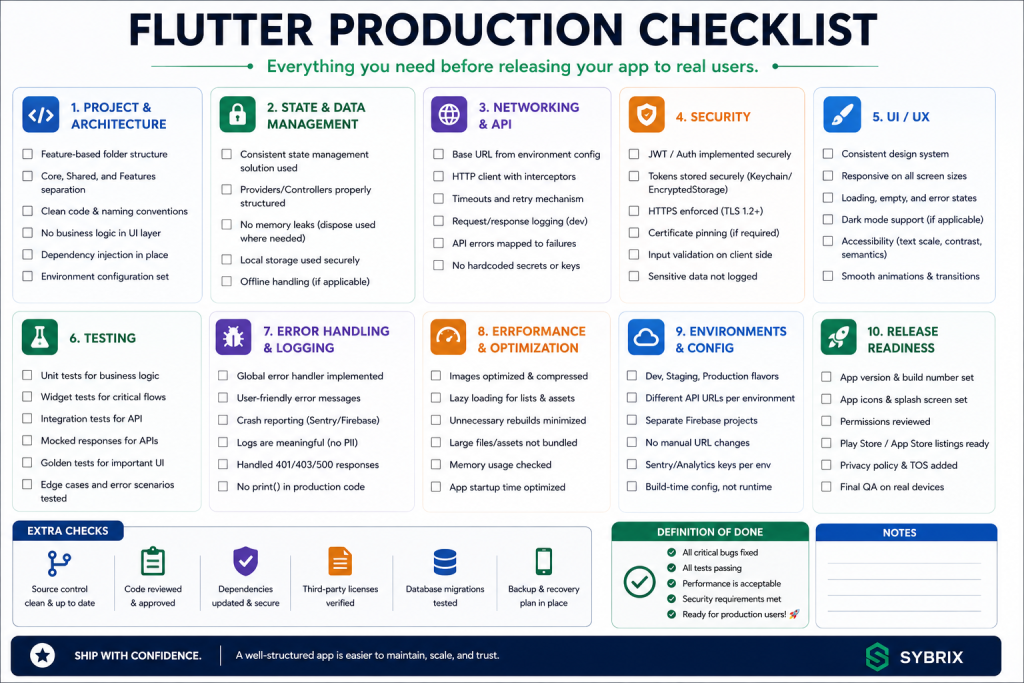
Not every widget requires extensive testing.
Instead, focus on the areas users depend on most.
Examples include:
- Login
- Checkout
- Payments
- Authentication
- API contracts
High-quality targeted tests usually provide more value than chasing 100% code coverage.
Logging and Monitoring
Production applications should capture useful information when problems occur.
Examples include:
- Network failures
- Application crashes
- Performance metrics
- User navigation
- API latency
Good monitoring makes debugging dramatically easier after launch.
Common Mistakes
Some of the most common Flutter architecture problems include:
- Putting everything inside
main.dart. - Creating one massive providers folder.
- Mixing state management libraries.
- Hardcoding API URLs.
- Repeating widgets across features.
- Ignoring environment configuration.
- Allowing UI to call APIs directly.
These issues usually become painful as applications grow.
Final Thoughts
Good Flutter architecture isn’t about creating the most folders.
It’s about making the project easy to understand six months from now.
A feature-based structure keeps responsibilities clear, simplifies onboarding, and allows applications to scale without becoming difficult to maintain.
At Sybrix, we’ve found that investing in architecture early saves far more time than reorganizing large codebases later.
About the Author
Bashir Lucas Samson Lukman is a Full-Stack Cross-Platform Developer and the founder of Sybrix, where he builds scalable web and mobile applications while researching artificial intelligence, software architecture, cybersecurity, and emerging technologies. His writing focuses on software engineering, cloud infrastructure, AI, and building reliable digital products.